Two versions of this system were built. This is the Python version: a fully coded pipeline for clients who want to own the codebase. The Flowise version builds the same pipeline without code, using a visual canvas. The stack and results are comparable. The choice between them depends on the client’s team.
When your team needs to own the code
Some clients want a knowledge assistant they can log into and maintain through a UI. Others want full control: the source code, the infrastructure, the ability to extend it themselves. This project was built for the second type of client.
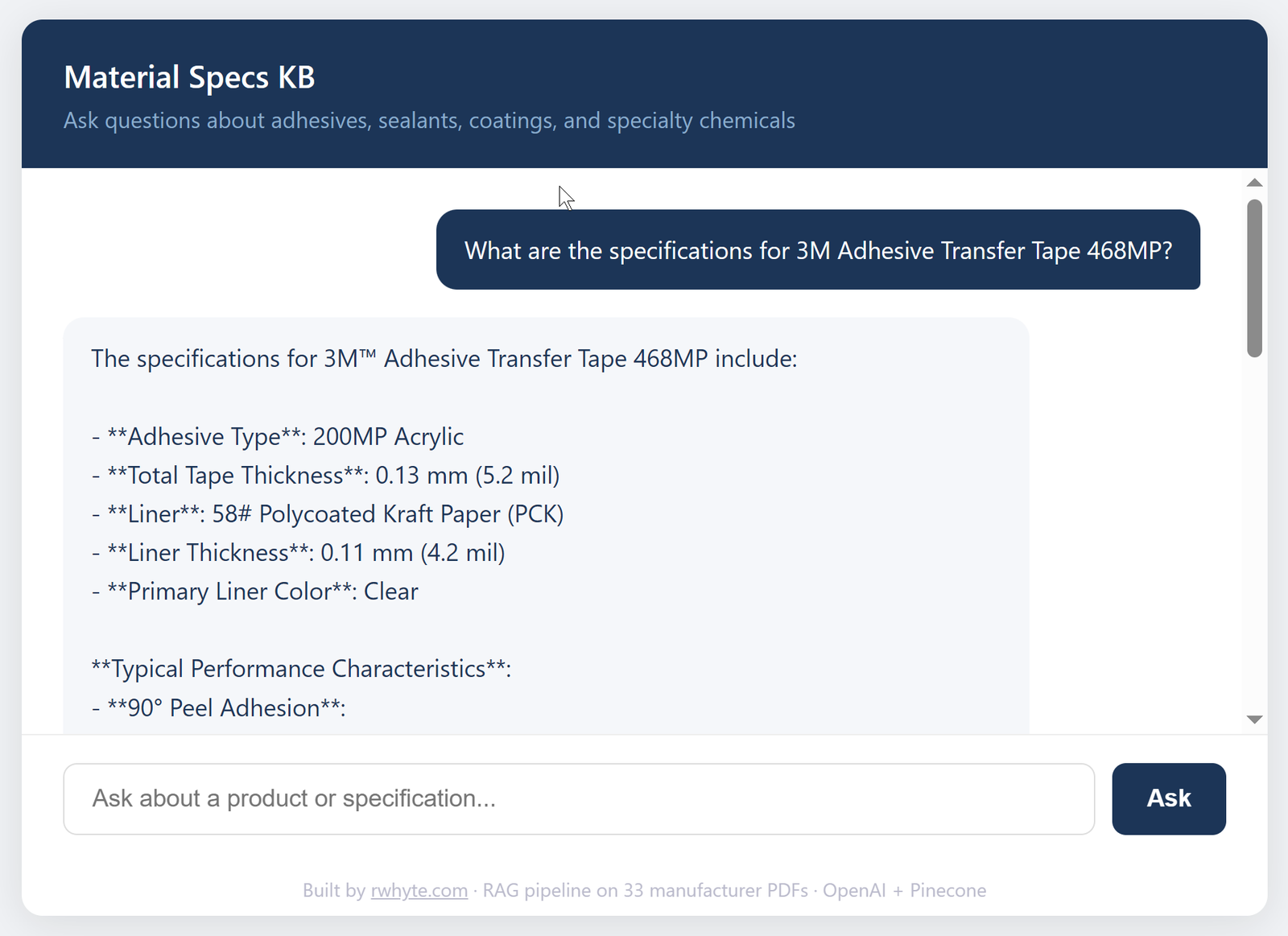
Material Specs KB is a RAG (Retrieval-Augmented Generation) pipeline built entirely in Python. It ingests 33 manufacturer PDFs from Google Drive, indexes them in a Pinecone vector database, and serves precise technical answers through a Flask web interface. Engineers and procurement teams can query adhesive specifications, application guidelines, and performance data in plain language — and get answers with exact values and source citations.
A companion no-code version of this same system was also built using Flowise. The Python version exists to demonstrate a different delivery track — one where the client owns every line of code.
The problem
Industrial material specifications live in PDF datasheets — dozens of them, spread across multiple manufacturers, each with different formatting and terminology. Finding a specific value (cure time, tensile strength, temperature resistance) means knowing which product to look in, finding the right PDF, and scanning the right table.
For teams sourcing adhesives, sealants, or specialty coatings across multiple vendors, this is a recurring time cost. A knowledge assistant that can answer “What is the overlap shear strength of 3M 468MP?” in seconds — with a source citation — is a practical productivity tool.
System architecture
Google Drive (33 PDFs)
        |
        v
  fetch.py — Google Drive API + PyMuPDF
        |
        v
  fetched_docs.json (raw extracted text)
        |
        v
  index_all.py — OpenAI text-embedding-3-small
        |
        v
  Pinecone (material-specs-python index, 83 vectors)
        |
        v
  app.py — Flask + GPT-4o-mini
        |
        v
  Chat UI (render.com)
The pipeline runs in three stages: fetch, index, serve. Each stage is a separate script and can be run independently.
What was built
fetch.py connects to Google Drive via a service account, recursively scans a shared folder structure, downloads each PDF, and extracts plain text using PyMuPDF. 33 PDFs processed, zero skipped.
index_all.py chunks the extracted text, embeds each chunk using OpenAI’s text-embedding-3-small model, and upserts the vectors to a Pinecone serverless index. 83 vectors total.
query.py is a CLI test interface for validating retrieval before building the web layer. Running queries in the terminal first meant problems with chunking and retrieval could be caught before deploying the web app.
app.py is a Flask application that embeds incoming questions, expands the query to handle terminology variation, retrieves the top 5 matching chunks from Pinecone, passes them as context to GPT-4o-mini, and returns the answer with source document names.
Technical decisions
These are the decisions that shaped the pipeline — and the reasoning behind each one.
Chunk size: 1,000 words with 200-word overlap Initial testing used 500-word chunks, producing 80 vectors. Queries against the test index returned truncated answers — technical values from spec tables were being split across chunk boundaries, causing the retriever to return incomplete data. Increasing the chunk size to 1,000 words with a 200-word overlap preserved table context and resolved the problem. The final index contains 83 vectors across 33 documents — fewer but more complete chunks. For prose documents, smaller chunks would be the right call. For spec sheets with dense tables, larger chunks win.
Pinecone for vector storage Pinecone was already in use for other projects, which eliminated setup time and reduced the learning curve. For a solo portfolio build, reusing proven infrastructure was the right call. The serverless tier on AWS us-east-1 handled the index size comfortably at no cost.
text-embedding-3-small for embeddings Chosen because it fits within the OpenAI free tier and offers 1,536 dimensions — enough resolution for technical terminology matching without the cost of larger models. Most RAG tutorials default to ada-002; text-embedding-3-small is newer, cheaper, and performs comparably for this use case.
GPT-4o-mini for generation Cost and latency. In a RAG pipeline, the retrieval step does the heavy lifting — by the time the LLM sees the question, it has already been given the right chunks as context. The job at that point is to synthesise and format a precise answer, not to reason from scratch. That task doesn’t require a frontier model, and GPT-4o-mini performs reliably for structured, fact-based responses.
Query expansion A query expansion step was added to handle the terminology mismatch common in technical documents. A user might ask about “cold temperature performance” while the spec sheet uses “low-temperature resistance” or “sub-zero application range.” The expansion step rewrites the query to include likely synonyms before embedding, improving the chance of a vector match. Whether it meaningfully improved retrieval in practice wasn’t formally measured — for a production system, A/B testing with and without expansion would be the logical next step.
TOP_K = 5 Five retrieved chunks is a standard starting point for RAG pipelines. It provides enough context for multi-part questions without overloading the LLM’s context window or inflating cost per query.
Results
The system returns precise technical values from the correct source documents. A query for the overlap shear strength of 3M Adhesive Transfer Tape 468MP returns:
“The overlap shear strength of 3M™ Adhesive Transfer Tape 468MP is 19.0 N/cm (174 lb/in²).”
Exact value. Correct units. Both metric and imperial. Source cited. That’s the outcome the system was built for.
A query for pricing returns a clean refusal: “I don’t have that information in the loaded specifications.” The system doesn’t guess.
Retrieval is fast once the app is running. The live demo is hosted on Render’s free tier, which means a cold start delay of up to 30 seconds if the instance has spun down — expected behaviour for free-tier hosting, not a pipeline issue.
What I’d do differently
For a production deployment, three things would change. First, chunk size would be tuned per document type rather than set globally — spec sheets benefit from larger chunks, but supporting documents like application guides could use smaller ones. Second, retrieval quality would be measured with and without query expansion to confirm it’s earning its place in the pipeline. Third, the Pinecone index would be rebuilt with metadata filters so users could scope queries to a specific manufacturer or product category rather than searching the full corpus.
Why Python over no-code
The Flowise version of this project does the same job with less setup — no coding required, Google Drive OAuth built in, visual canvas for the pipeline. For an SME client who wants a working system fast and doesn’t have developers on staff, that’s the right choice.
The Python version is the right choice when:
- The client wants to own and extend the codebase
- The system needs to integrate with internal APIs or databases
- The team has developers who will maintain it
- Monthly SaaS tool costs need to be eliminated long-term
- The project is a foundation for a larger AI system
Both tracks deliver the same outcome. The decision depends on the client’s team, not the complexity of the problem.
Stack
- Ingestion: Python, Google Drive API, PyMuPDF
- Embeddings: OpenAI text-embedding-3-small
- Vector database: Pinecone (serverless, AWS us-east-1)
- LLM: GPT-4o-mini
- Web framework: Flask
- Deployment: Render
- Version control: GitHub
Stack
| Layer | Technology |
|---|---|
| PDF ingestion | Google Drive API, PyMuPDF |
| Embeddings | OpenAI text-embedding-3-small |
| Vector database | Pinecone (serverless, AWS us-east-1) |
| LLM | GPT-4o-mini |
| Web framework | Flask |
| Deployment | Render |
| Version control | GitHub |
Live demo
material-specs-python.onrender.com
Note: hosted on Render’s free tier — allow up to 30 seconds for the instance to spin up on first load.